


my facility: FDV system for full control over property, operations and tenancy
my facility brings together all information about properties, buildings and units in one place. Get an overview of operations, leases, documents and tasks – all digitally and accessible from anywhere.
Efficient task management, integration with the Norwegian Mapping Authority and automatic storage of documents and emails make property management simple, secure and traceable.
Why choose my facility?
- Complete overview of properties, buildings and units
- Full control over leases and income
- Digital workflow for operations and maintenance
- Automatic saving of documents and emails
- Cadastral integration with the Norwegian Mapping Authority
- Cloud-based – available on tablets, Macs and PCs
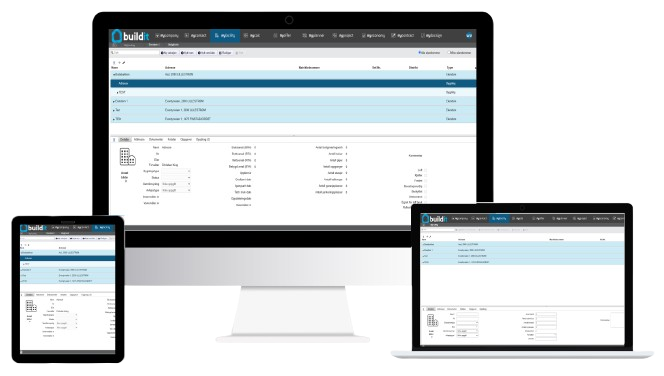
my facility: Simple, structured and efficient property management
- ✔ Register and manage properties and tenancies in one place
- ✔ Send and receive work orders from operations personnel
- ✔ Cloud-based: mobile, Mac and PC
- ✔ Get started without a course
* Recommended price is NOK 25,000 / year excluding VAT.

How my facility works (3 steps to easy property management)
1.
Registration and setup
Add properties, buildings and units. Retrieve cadastral data directly from the Norwegian Mapping Authority.
2.
Daily operations and follow-up
Create work orders, assign tasks, and store emails and documents directly on the property.
3.
Overview and history
Track projects, tenancies and maintenance over time. Get fully documented history and control at all levels.
Features in my facility
my facility collects all the information you need to have full control over your properties and units, from work orders and documentation to lease agreements and project overviews.
The system gives you better overview and security, with easy access to history and full traceability of all work performed.
With my facility you get structure, predictability and control, no matter how many buildings or units you are responsible for.

Full control over properties
Register and manage all properties and units in the system. Keep track of building, room and property information in one place.
Work order and task management
Send, receive and follow up on work orders from operations personnel at all levels. Assign responsibilities and have full visibility of progress.
Document archive and history
Collect drawings, reports and other documentation. Traceability of each measure and project provides security and easy retrieval.
Cadastral integration
Search and retrieve correct cadastral information directly from the Norwegian Mapping Authority, and automatically store information in the property register.
Leases and finances
Manage lease agreements with information about the tenant, deposit, rental cost and invoice basis, for a full overview of your income.
Project overview
See which projects and measures have been completed on each property and unit, with easy access to history and status.
Integration and interaction
myfacility connects seamlessly with other FDV modules and Microsoft Office, so you get a complete overview without duplication of work.
Who is my facility suitable for?
- Housing associations and property managers
- Operations personnel and technical managers
- Project managers and FDV managers
- Municipalities and public property managers
- Companies with many buildings and leases
From small buildings to large property complexes, my facility adapts to your everyday life and ensures full control, structure and predictability in property management.

my facility vs alternatives
my facility vs manual methods:
- Manual methods: risk of errors, lack of overview and time-consuming updates
- my facility: digital, automatically stored and easy to manage, with full visibility across properties See the difference from manual methods
my facility vs other systems:
- No installation – always up to date
- No course required
- Full history and documentation for all properties and units
- Seamless integration with Microsoft Office and cadastral information
Calculate savings with my facility
The calculator shows how much time and cost you save by using myfacility for operations, tasks and property management. Adjust the number of properties, tasks and time reduction to see your annual gain.
Customer stories

“One of the things we like best about this system is that we can gather all the information in one place, where everyone has access to it.
We would love to be an ambassador for buildit.”
Related articles
Want to learn more about property management and FDV systems? Here are some of our most popular articles:

Frequently Asked Questions (FAQ)
-
Yes, the system is adaptable to both small buildings and larger property complexes, and provides full overview and control at all levels – from single rooms to entire building complexes.
-
All documentation and emails are automatically saved to the correct property or unit, with full history.
-
All tasks can be registered, assigned to responsible personnel and followed up directly in myfacility, with real-time status updates.
-
Yes, myfacility integrates seamlessly with Microsoft Office, cadastral information and other modules in the FDV system.
-
Prices vary depending on the features and number of users you need. Contact us for a customized quote.
-
Yes! We offer a demo so you can try it out and see how it can make your work easier before you decide.
Click here to book a demo
