
What is IFC? A simple explanation for construction and civil engineering
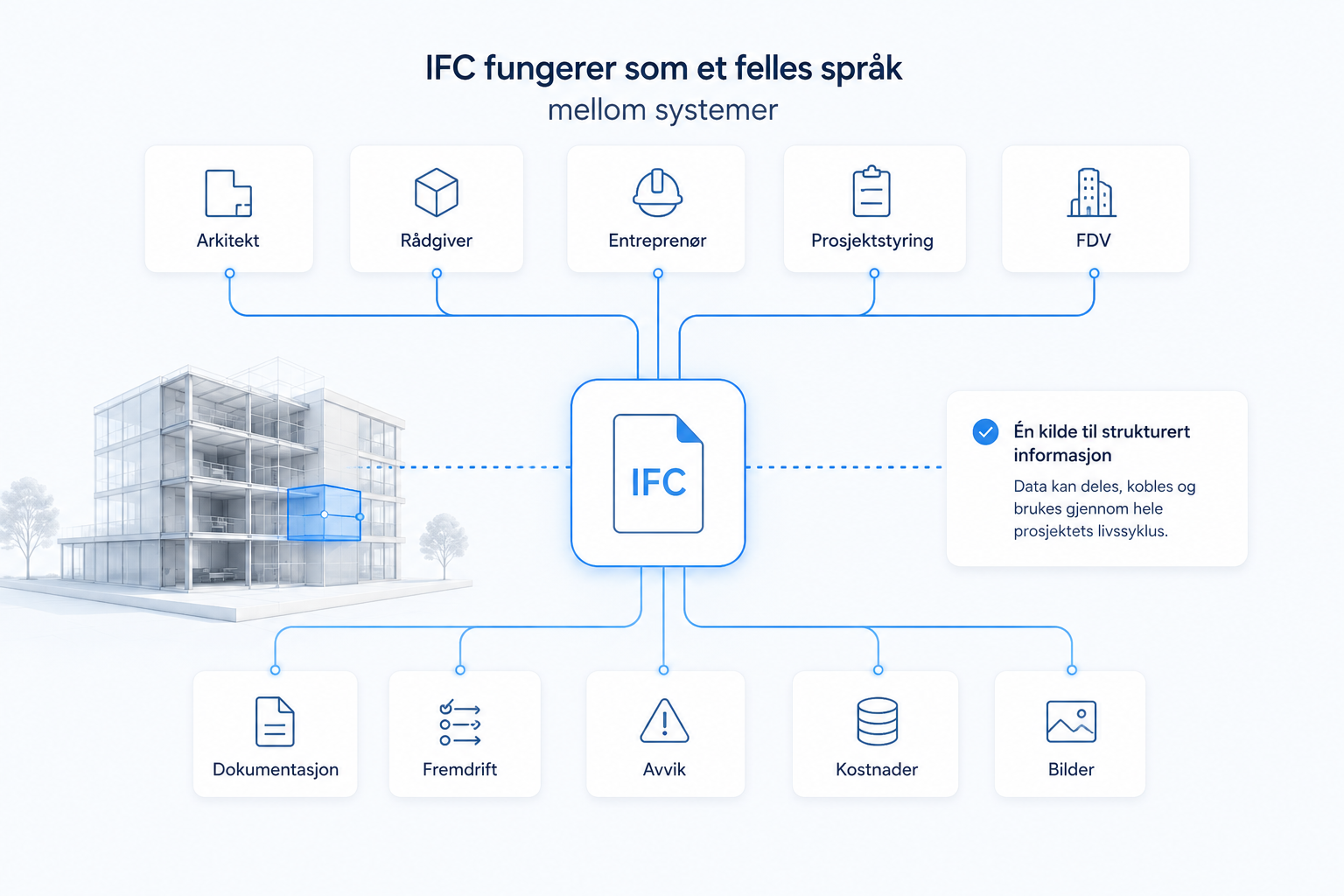
IFC makes it possible to share BIM data between different systems, disciplines and actors in a construction project.
That's one of the reasons why IFC is so important in modern, model-based workflows.
When the information in a building model can be structured, shared and connected, the model becomes more than a 3D view. It can become a common basis for planning, documentation, progress, costs and operations.
Do you want to understand how IFC can be used in practice?
See how IFC can be used to connect model, documentation, progress, and project data into one more structured construction workflow.
What does IFC mean?
IFC stands for Industry Foundation Classes .
In short, IFC is an open standard for building information. It is used to exchange BIM data between different programs and systems.
This means that project information doesn't have to be locked to one specific tool.
For example, an architect can model in one system, consultants can use other professional tools, the contractor can use their own solutions for project management, and the client can use their own systems for documentation or FDV.
IFC makes it possible to share information across borders.
Therefore, IFC is one of the most important standards within openBIM .
IFC is closely related to BIM. Where BIM is about structuring information about the building, IFC is about how this information can be shared and used across systems. If you haven't read it yet, you can start with our article on What is BIM? A simple explanation for construction and civil engineering
Why is IFC important?
Many different systems are often used in a construction project.
For example, you can:
the architect uses a modeling tool
advisors use their own professional tools
the contractor uses planning and project management systems
project management uses document management
builder or operator use FDV systems
Without a common standard, information can be difficult to share.
Data remains in separate systems. Professionals work in different formats. Changes must be transferred manually. Important information can disappear between design, construction and operation.
IFC acts as a common language between the systems.
It makes it possible to:
share models between different actors
structuring building information
connect data to objects in the model
work more openly across software
reduce dependence on one supplier
use BIM data further in other work processes
This is precisely what makes IFC important. Not just as a file format, but as a structure for collaboration.
IFC contains more than geometry
Many people think of a BIM model as a 3D model of the building.
But an IFC model contains more than just geometry.
It can also contain information about the objects in the building.
Each building part can have:
object type
properties
relationships
metadata
location
link to other objects
unique identity
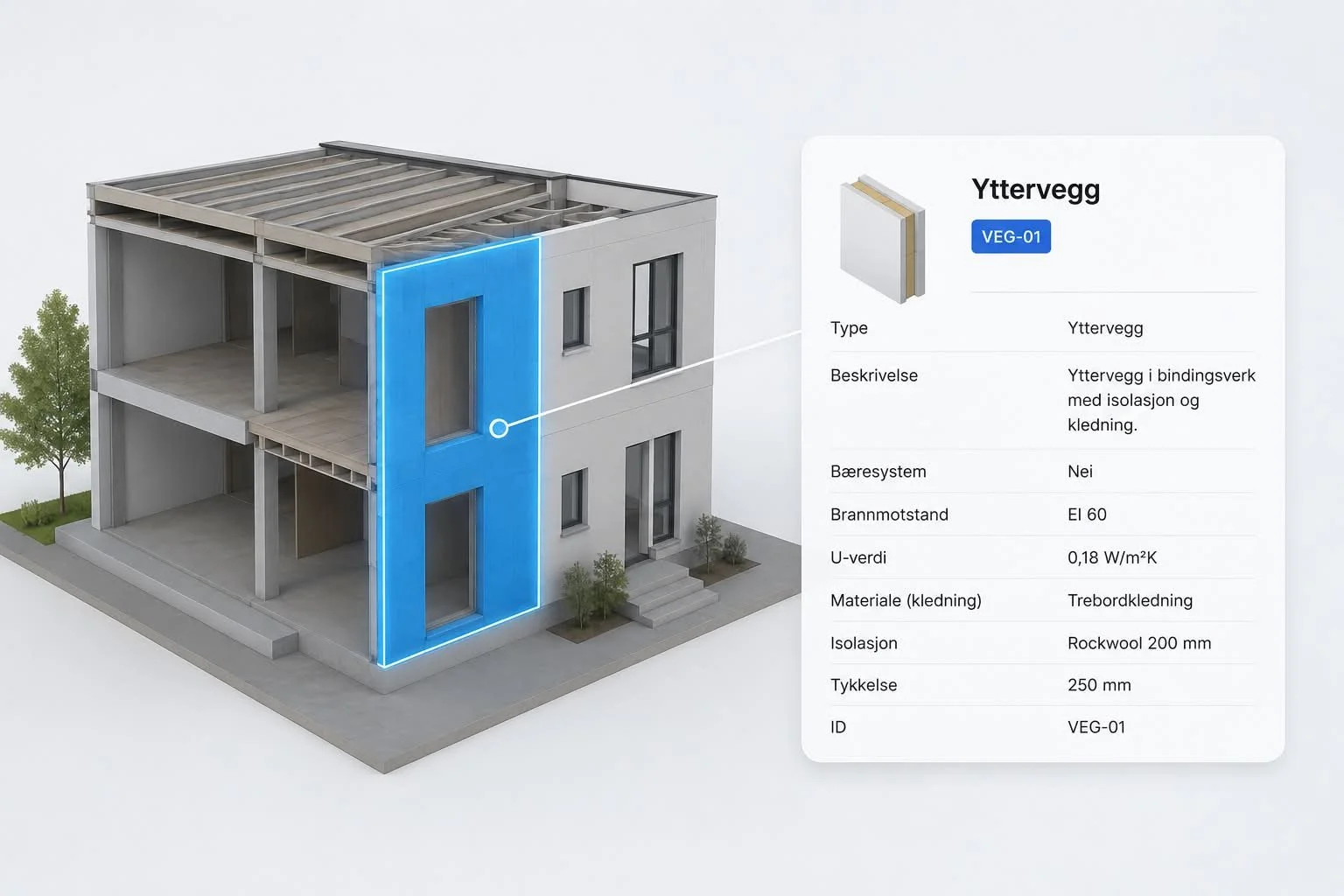
For example, a wall may have information about:
materials
thickness
fire class
sound requirements
spatial connection
phase
classification
responsible subject
This makes the IFC model more valuable than a regular 3D drawing.
It not only shows what the building looks like, it can also describe what the building consists of.
IFC GlobalId: the identity of the object
An important principle in IFC is that objects in the model can have a unique ID.
This is often called IFC GlobalId .
GlobalId makes it possible to identify a specific object in the model. For example, a specific wall, door, beam, column or technical component.
This means that other project information can be linked to this particular object.
For example, a specific exterior wall can be connected to:
progress status
construction site photos
associated deviations
checklists
FDV documentation
material information
responsible contractor
change history
costs
hours
Then the information is not just stored in folders, lists or separate systems.
It is connected directly to the part of the building it is about.
This is where IFC becomes particularly interesting for model-based project management.
From model to project data
With BuildrTwin, information such as documentation, images, deviations, hours and progress can be linked directly to the objects in the IFC model.
From model exchange to model-based work
Traditionally, IFC has often been used for:
coordination
visualization
collision control
model exchange
quantity withdrawal
These are still important applications.
A common use for IFC is quantity take-off and calculation. But IFC import alone is not always enough to achieve a good calculation process. In the article From IFC import to model-based calculation, we take a closer look at how IFC data can be used further in the calculation work.
But IFC can also be used as a basis for more operational workflows.
When tasks, documents, images, hours, costs, and progress are connected to objects in the model, the project can work in a different way.
Then the user can:
click on a building part
see relevant documentation
find associated discrepancies
follow progress
see photos from the construction site
filter information directly in the model
organize the work according to the actual structure of the building
IFC then becomes more than just a format for sending models between systems.
There will be a common data base for the project.
Example: one wall, many connections
Let's say the project has an exterior wall in the model.
In a traditional workflow, the information on this wall may be scattered:
the drawing is located in one folder
the discrepancy lies in another system
Pictures are on mobile or in email.
FDV documentation is located elsewhere
costs are included in the calculation
progress is on schedule
the dialogue is in Teams or e-mail
The information exists, but it is not gathered around the object it actually applies to.
With a model-based workflow, the information can be linked to the same building part.
Then the wall in the model can become the entrance to all relevant information.
This provides a better overview, less searching and clearer history.
How IFC can support project management
IFC can be useful in several parts of project management.
For example, the model can be used to connect:
propulsion and building parts
documentation and objects
deviation and placement in the model
pictures and specific parts of the building
hours and work performed
costs and quantities
FDV and technical components
This makes it easier to understand what the information applies to.
Instead of just seeing a list of tasks or documents, the project can see the information in the context of the building.
It is particularly useful in complex projects, where many disciplines, documents, and changes must be coordinated simultaneously.
How buildit uses IFC
buildit uses the IFC structure as the basis for connecting project data directly to the model.
By using the object structure in IFC, information can be linked to specific building parts.
This may apply, for example:
tasks
documentation
photos
hours
costs
deviation
progress
history
The goal is for the project to not only work with the model alongside project management.
The model should become an active part of the workflow.
This allows project data to be traced back to the correct objects in the building, and the user can work more visually, structured and model-based.
From IFC model to digital twin
When project information is connected to the model over time, IFC can also become an important foundation for a digital twin.
A digital twin is not just about showing the building visually.
It is about collecting relevant information about the building, so that the model can be used throughout design, construction, handover and operation.
When activities, documentation, costs, images and history are linked to specific building parts, the model becomes more data-driven.
Then the project can get:
better overview
better traceability
easier documentation
more searchable information
better basis for operation and maintenance
The building is not just visualized.
It is structured with data.
In summary: What is IFC?
IFC is an open standard for building information.
It makes it possible to share BIM data between different systems and actors, without being locked into one software.
But IFC is not just about model exchange.
When IFC objects are used as a structure for project information, the model can become an active working tool.
Tasks, documents, images, hours, costs and history can then be linked directly to the building parts in the model.
This is what makes IFC an important foundation for model-based project management, openBIM and digital twins.
Would you like to see how IFC can be used in practice?
Book a review and see how Buildit and BuildrTwin can use IFC as the basis for a model-based project platform - with links between model, documentation, progress and project data.
